
Data from the Samsung Health app can be synced to HeiaHeia via the Health Connect platform. First, link Samsung Health with Health Connect, and then link Health Connect with HeiaHeia. If you have not yet installed the Health Connect app on your device, download it from the Google Play Store.
1. First, link Samsung Health with Health Connect
-
Open Samsung Health and go to Settings.
-
Tap Connected devices and apps and select Health Connect.
-
Choose Allow all to ensure your data is shared with Health Connect, then tap Allow again to confirm.
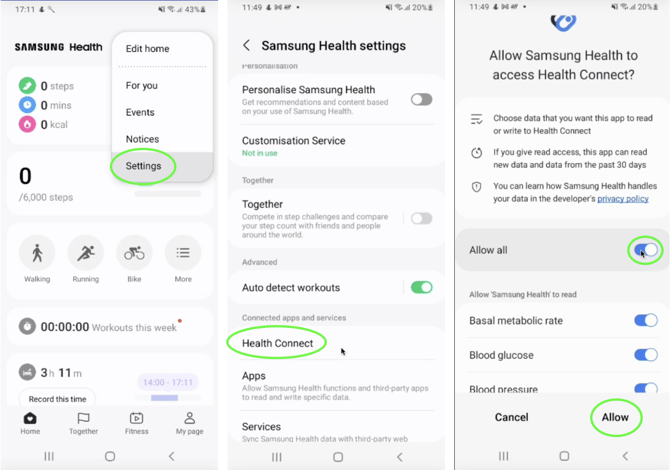
You can adjust your data-sharing permissions at any time by going to Settings > Data sharing > Health Connect > Open Health Connect.
2. Finally, link Health Connect with HeiaHeia
Instructions can be found here: Connect HeiaHeia and Health Connect